Launching your website involves connecting it to a domain name, i.e. your public online web address. e.g. our domain is BookingTimes.com.
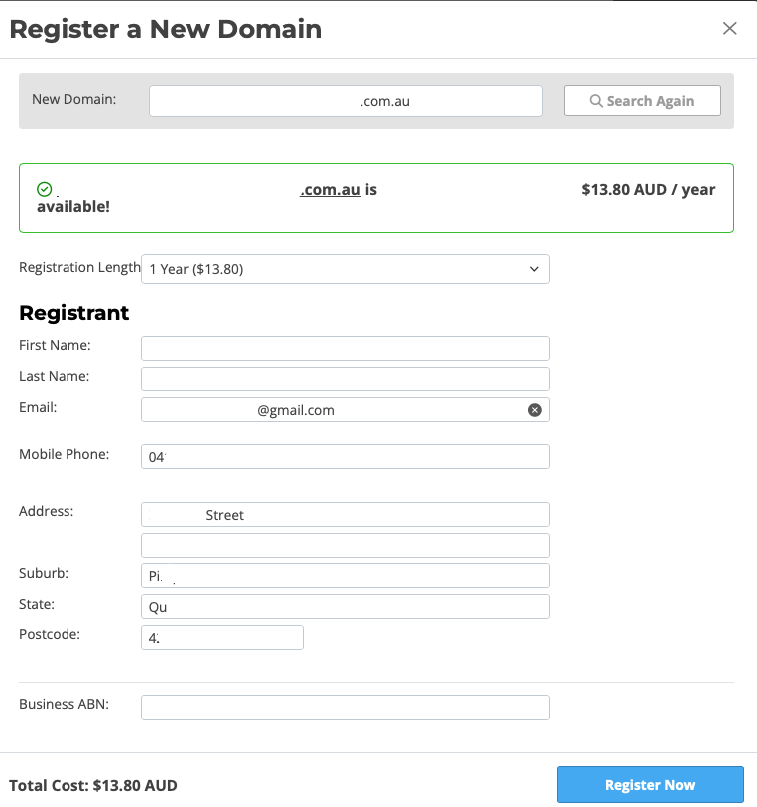
If you do not already have a domain, you can register and purchase one directly through your website when you are ready to go live. This is an extract of the go live process where you can register your domain.
Steps
Navigate to Setup > Domain > Domain Management
Click ‘Register a New Domain’
Search for a domain – Enter your preferred domain name to check its availability and click Search.
Confirm the price – If the domain is available, you’ll see the cost and can proceed with the purchase.
Click ‘Next’
Choose Registration Length – You can select how long you want to register this domain for initially and then domain renewals are renewed every year.
Enter domain owner details – Provide the required registration details:
First Name
Last Name
Email
Mobile Phone
Address
Suburb
State
Postcode
ABN (Required for
.com.audomains)
Click Register Now – This will register the domain under your name and the billing will be added to your usual billing cycle.
To start the process of switching your website to use your domain, click ‘Go Live.’ Please refer to How to make your website live article for additional steps required to make your website live.