---
title: "Coding Website Template Footer"
slug: "coding-website-template-footer"
updated: 2024-06-20T00:00:40Z
published: 2024-06-20T00:00:40Z
canonical: "support.bookingtimes.com/coding-website-template-footer"
excludeFromSearch: true
---
> ## Documentation Index
> Fetch the complete documentation index at: https://support.bookingtimes.com/llms.txt
> Use this file to discover all available pages before exploring further.
# Coding website template footer
When we generate a new website from one of our website templates we automatically replace the content in the footer with the new business information. This includes:
- Replacing the logo
- Replacing the business details such as Business Name, Location, Phone Number, and Email
- Showing or hiding the social media icons depending on which social media accounts have been added to the system
This guide will show you how to code your website footers so the placeholders can be automatically updated.
## 1. Logo
The logo image must be wrapped in a parent element which has the class name "footer-logo" 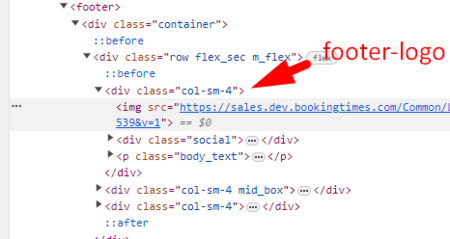
## 2. Business Details
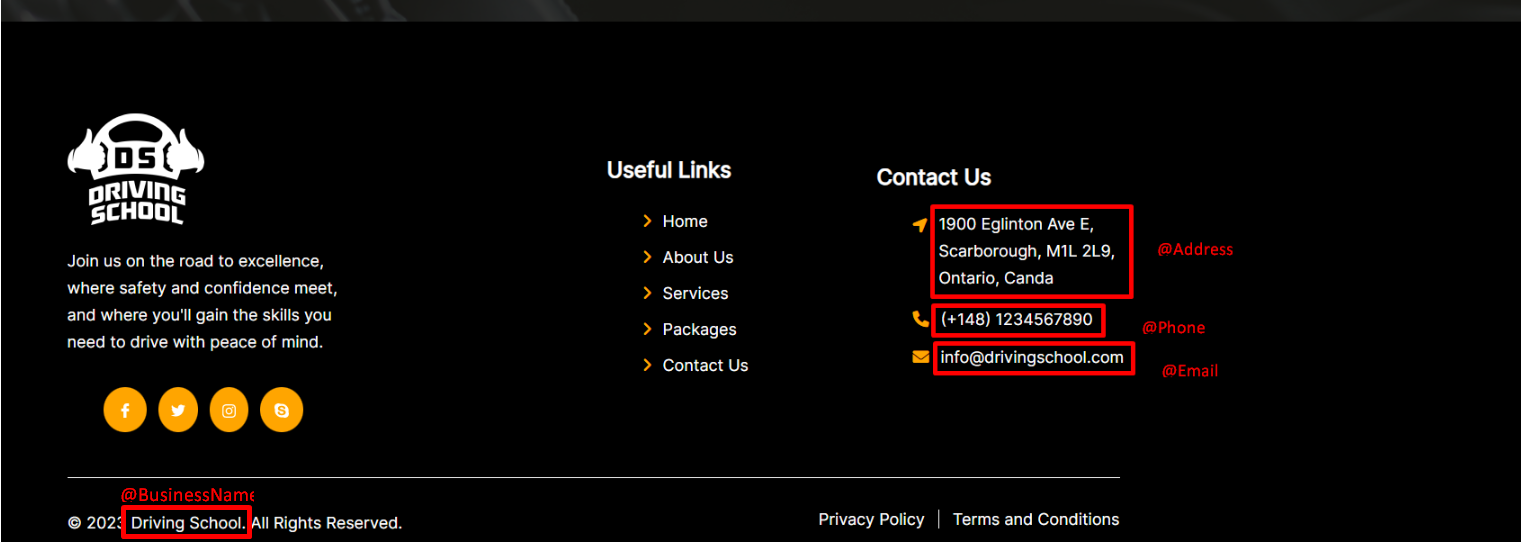
The following business details should use their respective placeholder instead of plain text:
| Business Name | @BusinessName |
| --- | --- |
| Address | @Address |
| Phone Number | @Phone |
| Email Address | @Email |
## 3. Social Media Icons
We will show or hide the social media icons and automatically update the social media link based on which social accounts have been linked to the system.
Social media icons should be contained within a list and each list item (or icon) should have the following classes and URL placeholders applied:
**Required Icons (all templates should have these icons)**
{your icon image/code to go here}
{your icon image/code to go here}
{your icon image/code to go here}
{your icon image/code to go here}
{your icon image/code to go here}
{your icon image/code to go here}
{your icon image/code to go here}